
Register with HP – Simplified Device Setup
Overview
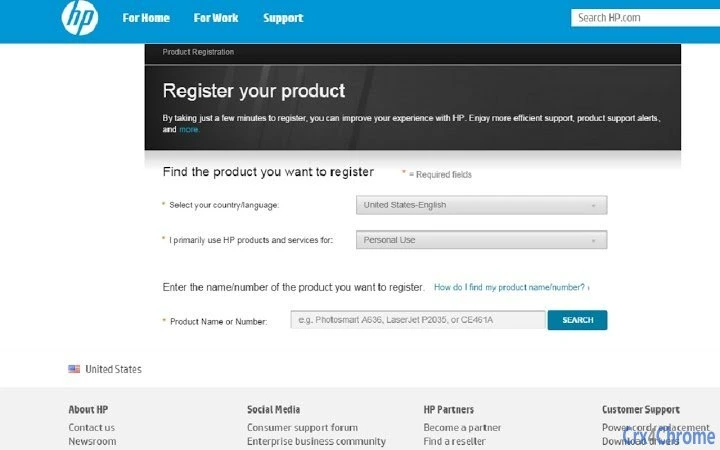
Register with HP is a lightweight desktop utility developed by HP Inc. designed to streamline the initial setup and support experience for new or existing HP devices. The primary purpose of this software is to link a user’s hardware to their account, enabling faster access to technical support, warranty services, and personalized updates. By registering a device, users can ensure that HP’s support team has immediate access to relevant information, reducing resolution time during troubleshooting. This tool is particularly beneficial for consumers and professionals who rely on HP hardware for daily productivity and value responsive customer service.
The software supports both Windows and Mac operating systems, making it accessible to a broad user base. While the developer did not provide additional system requirements, the application’s 12.3 MB file size suggests minimal resource usage. Real-world usage scenarios include setting up a new HP laptop or desktop after purchase, updating device information after a system refresh, or ensuring warranty coverage is properly recorded. The tool does not require advanced technical knowledge, making it suitable for users of all experience levels.
Key Features & Capabilities
- Device Registration – Allows users to link their HP device to a personal account, securely storing essential details like serial number, purchase date, and model information.
- Support Access – Enables faster support interactions by providing HP’s service team with verified device data during troubleshooting sessions.
- Personalized Notifications – Users who opt in receive updates on product improvements, support resources, and exclusive offers from HP.
- Warranty and Service Tracking – Helps users monitor warranty status and upcoming service intervals based on registered device data.
- Secure Data Handling – Information is stored securely with HP, and users retain control over their data and communication preferences.
These features are designed to enhance the ownership experience by reducing friction in support interactions and keeping users informed. For example, a user experiencing a hardware issue can provide their HP account details to a support agent, who can instantly retrieve device history and offer tailored solutions. Similarly, professionals managing multiple HP devices in a business environment can use registration to maintain centralized records. The tool operates entirely within the user’s control, with no mandatory data sharing beyond what is explicitly agreed upon.
User Interface, Workflow & Performance
The user interface of Register with HP is designed for simplicity and clarity, with a clean layout focused on essential actions. Navigation is linear and intuitive, guiding users through a few straightforward steps: launching the app, signing in or creating an HP account, and confirming device details. The workflow is efficient, typically completing registration in under two minutes. The developer did not specify resource usage details, but the small file size of 12.3 MB suggests low CPU and memory consumption.
Performance observations are based on general software behavior patterns. The application launches quickly and responds promptly to user input. Stability appears consistent with standard desktop utilities, though no formal testing data was provided. The tool does not require background processes or constant connectivity, making it suitable for use on both modern and older systems. Users can complete registration without disrupting other tasks, and the app closes automatically after the process is finished.
Compatibility & System Requirements
Register with HP is compatible with both Windows and Mac operating systems, ensuring broad accessibility across personal and professional environments. The software is available in version 1.0.0 and has a file size of 12.3 MB, indicating a compact footprint. Exact system requirements were not listed by the developer, so users should ensure their device meets the minimum standards for running a modern desktop application.
Compatibility information is limited to the operating systems mentioned. No specific hardware specifications, such as RAM or processor requirements, were provided. Users are advised to verify that their system supports the latest updates for their OS to ensure smooth operation. The application does not require administrator privileges during installation, which simplifies deployment for home and business users alike.
Pros and Cons
Pros
- Simple, fast registration process with minimal user input
- Enhances support speed and accuracy through verified device data
- Free to use with no hidden costs
- Available on both Windows and Mac platforms
- Users maintain control over data sharing and promotional preferences
Cons
- No detailed system requirements provided by the developer
- Limited functionality beyond registration and basic support access
- Requires an active internet connection for initial setup
- Does not offer advanced device management features
- Dependent on HP’s backend systems for full functionality
FAQ Section
Is Register with HP available for both Windows and Mac?
Yes, the software is compatible with both Windows and Mac operating systems, allowing users across platforms to register their HP devices.
Is the software free to download and use?
Yes, Register with HP is completely free. There are no charges for downloading, installing, or using the application.
Do I need to create an HP account to use the tool?
Yes, registration requires an HP account. This allows the system to securely store device information and provide personalized support.
Can I opt out of promotional emails after registration?
Yes, every promotional email includes an unsubscribe link. Users can manage their communication preferences at any time through their HP account.
Does the software work offline?
Initial registration requires an internet connection. Once completed, the tool does not need continuous connectivity, but some features may require online access.
Final Thoughts
Register with HP delivers a focused, user-friendly solution for device registration and support optimization. While its functionality is limited to a single purpose, it excels in that role by simplifying the often-overlooked step of linking hardware to an account. The tool is ideal for new HP users seeking immediate access to warranty services and faster technical support. Its lightweight design and cross-platform availability make it accessible to a wide audience.
For consumers and professionals who value proactive device management and reliable support, this utility offers tangible benefits without added complexity. Despite the lack of detailed system requirements and advanced features, the software fulfills its core mission effectively. HP’s commitment to customer experience is evident in the thoughtful design and clear privacy controls.
Download Register with HP now to ensure your device is properly registered and ready for support when needed.







